

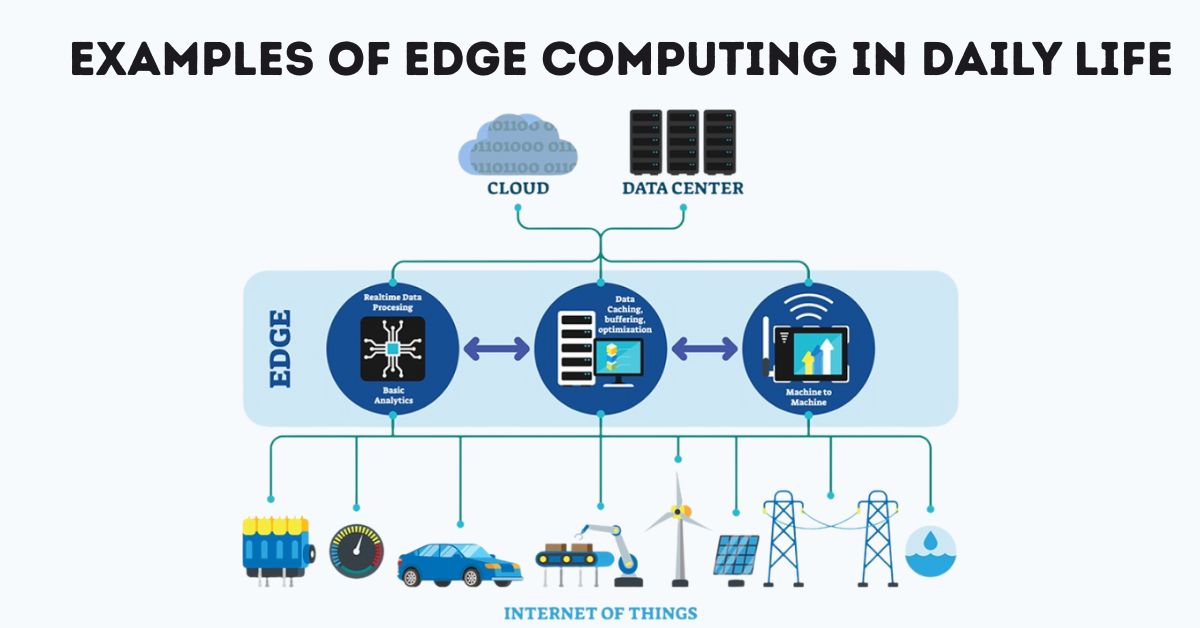
Technology is moving forward very quickly. Not long ago, most apps and devices depended only on cloud computing. This meant that your data had to travel to large servers, get processed there, and then return back to your phone or computer. It worked, but sometimes it was slow and not always reliable.
Now, a new approach called edge computing is becoming part of daily life. In simple words, edge computing means handling data closer to where it is created like on your phone, smartwatch, car, or even a home device instead of always sending it far away to a cloud server.
This change makes apps faster, smoother, and more reliable, even when your internet connection is weak. But what does this really look like in everyday life? Let’s go through some practical examples.
Examples of Edge Computing in Daily Life
1. Smart Home Devices
Smart speakers such as Alexa and Google Nest are a good example. Earlier, every command you gave had to be sent to a cloud server before getting a reply. Now, many commands are processed directly inside the device. That’s why they respond faster when you say things like “Turn off the lights” or “Play music.”
2. Video Streaming and Gaming
Services like Netflix and online gaming platforms reduce delays by using servers that are located closer to you. This is edge computing in action. Instead of your video or game data traveling far, it comes from a nearby server, which means smoother streaming and quicker gaming responses.
3. Health and Fitness Apps
Smartwatches like the Apple Watch or Fitbit now use edge computing to process health data instantly. Heart rate, steps, and calories burned are calculated on the device itself. You don’t need to wait for the data to sync online. You get results right away on your wrist.
4. Navigation and Ride-Sharing Apps
Apps such as Google Maps, Uber, and Lyft need real-time updates. With edge computing, traffic updates, driver positions, and routes are processed faster, giving you accurate arrival times and smoother navigation.
5. Security Cameras and Smart Surveillance
Modern security cameras often analyze video footage locally using edge AI. For example, they can detect motion or recognize faces without sending every second of video to the cloud. This saves internet data and gives quicker alerts.
6. Mobile Banking and Payments
Apps like Google Pay and Apple Pay sometimes verify small transactions on your device before checking with the bank. This makes mobile payments both faster and safer.
How Edge Computing Makes Apps Better
- Faster Response: Data doesn’t need to travel far, so apps react quickly.
- Better Privacy: Sensitive information can stay on your device instead of being sent to external servers.
- Works Offline: Some apps continue working even with weak internet.
- Saves Data: Not all information is uploaded to the cloud, so less bandwidth is used.
Why It Matters to You
You may not think about it, but edge computing is already improving the apps you use daily. From instant routes on Google Maps to smoother online games and faster replies from Alexa, edge technology is quietly at work.
In the future, it will become even more important for things like self-driving cars, advanced healthcare devices, and AR/VR apps, where split-second responses are needed.
Final Thoughts
Edge computing is not just a tech trend. It’s already part of your life. From smartwatches to video streaming, navigation apps to home security, it is making apps faster, safer, and more reliable.
The next time an app feels instant and smooth, remember that edge computing might be the reason. And as technology grows, this hidden power will continue to shape how we use our phones and devices every day.







2 thoughts on “How to Use Edge Computing in Everyday Apps: Examples of Edge Computing in Daily Life”